 Alyssa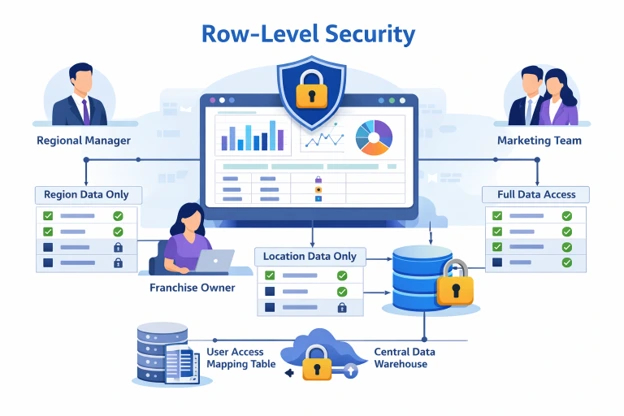
Introduction
Row-level security in Looker Studio allows organizations to securely share dashboards while ensuring that users only see the data they are authorized to access.
As analytics and reporting infrastructures scale, dashboards are increasingly shared across multiple stakeholders, such as executives, managers, teams, and franchise owners. While centralized dashboards streamline reporting, they also raise an important challenge: ensuring users only see the data they are authorized to access.
Without proper access controls, sensitive business information may be unintentionally exposed. Creating separate dashboards for each user group may work temporarily, but quickly becomes inefficient and difficult to maintain.
This is where Row-Level Security (RLS) becomes essential. By implementing Row-Level Security in dashboards, in this example, Looker Studio, organizations can create a single dashboard while automatically restricting data visibility based on the user accessing the report.
In this blog, we will explore how Row-Level Security works and walk through a practical approach to implementing it using a data access mapping table.
What Is a Row-Level Study?
Row-Level Security (RLS) is a data governance method that restricts access to specific data depending on the user viewing the report.
Instead of creating multiple dashboards for different stakeholders, RLS allows a single dashboard to dynamically filter data based on the viewer’s permissions.
For example:
| User | Data Visible |
| Executives | All locations |
| Franchise Owner | Their assigned location/s |
| Regional Manager | Locations within their region |
| Teams (Marketing/Analytics) | All Locations |
Why Row-Level Security Matters
Organizations managing dashboards across multiple teams often face several challenges:
- Duplicate dashboards created for each region or client
- Increased maintenance when metrics or visualizations change
- Risk of exposing confidential data to unauthorized users
- Difficulty maintaining a single source of truth
Implementing Row-Level Security solves these issues by allowing data access to be managed dynamically without duplicating dashboards.
This improves:
- Data governance
- Dashboard scalability
- Operational efficiency
- Security and compliance
Preparing Your Data for RLS
The foundation of Row-Level Security is an access mapping table that defines which users are allowed to view specific data segments.
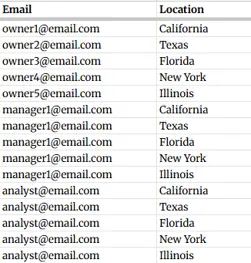
Fig 1. Sample Access Mapping Table
This table links each user’s email address to the data they are authorized to access.
For scalable analytics environments, it is recommended to store this mapping table in a data warehouse such as Google BigQuery, where it can easily integrate with reporting datasets.
But for this example, we will directly connect Google Sheets as a new data source in Looker.
Implementing Row-Level Security in Looker Studio
Once the access mapping table is prepared, the next step is to configure the dashboard to enforce access restrictions.
The process generally involves:
- Connecting both the reporting dataset and access mapping table to Looker Studio
- Blending the datasets based on shared dimensions (such as location or account ID)
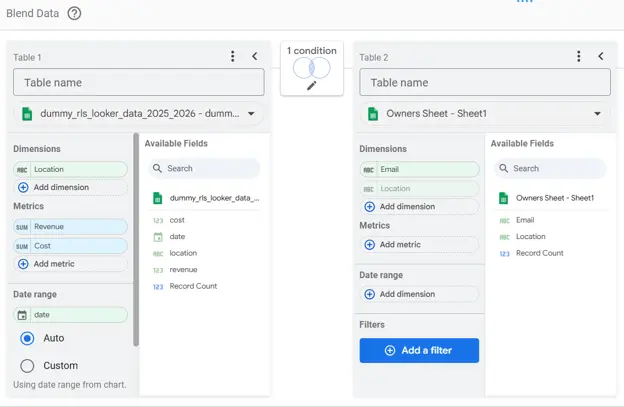
Fig 2. Sample Blend in Looker Studio.
In this example, the datasets are blended using the Locations field.
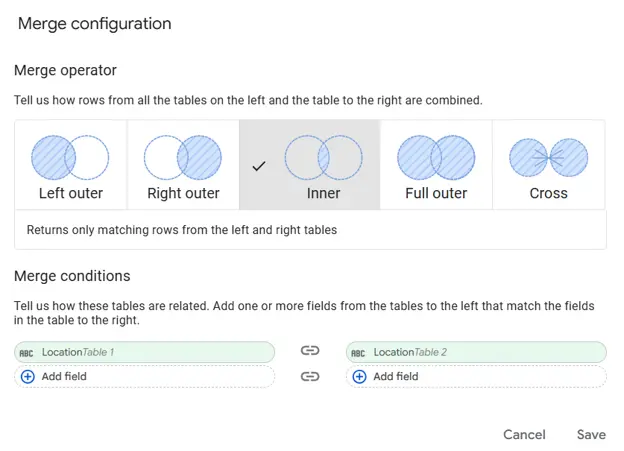
Fig 3. Inner join used in Blend in Looker Studio.
3. Apply a filter that links the logged-in user to the corresponding record in the mapping table. Looker Studio includes a built-in function that identifies the viewer’s email address:

Fig 4. Step 1 in Applying Filter by Email.
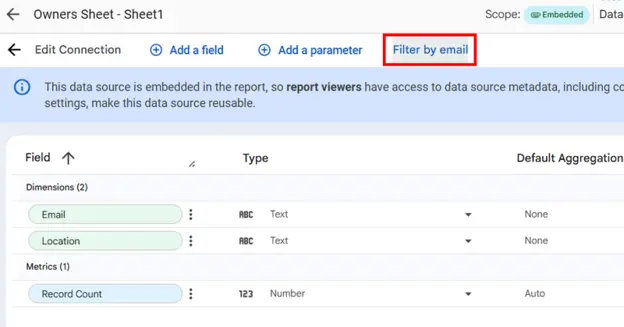
Fig 5. Step 2 in Applying Filter by Email.
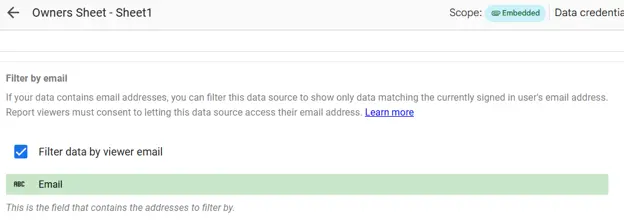
Fig 6. Final Step in Applying Filter by Email.
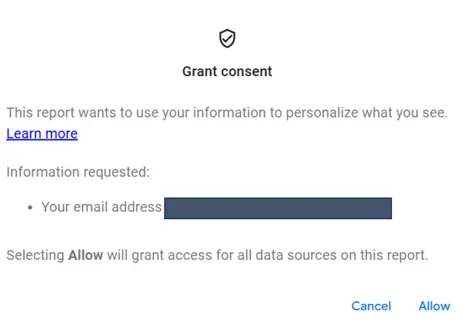
Fig 7. Grant Consent Pop-up so that users can view their data.
By filtering the dashboard using this value, the report automatically restricts visible data to rows associated with the logged-in user.
Testing Row-Level Security
Before sharing the dashboard broadly, it is important to test the configuration.
Typical testing scenarios include:
- A user who should only see one location
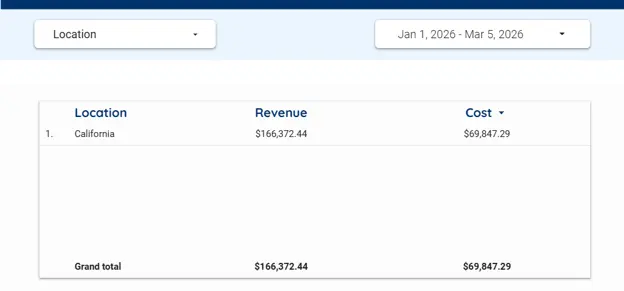
Fig 8. Sample dashboard – owner/team can only access 1 location.
- A regional manager with multiple assigned locations
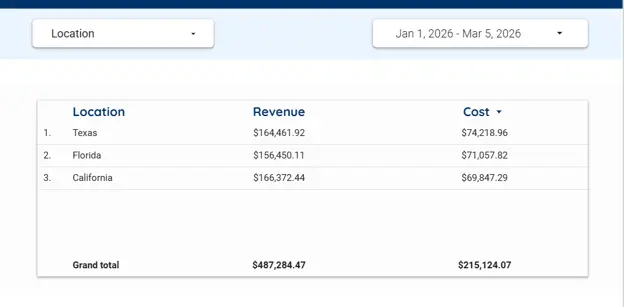
Fig 9. Sample dashboard – owner/team can access multiple locations.
- An administrator with access to all data
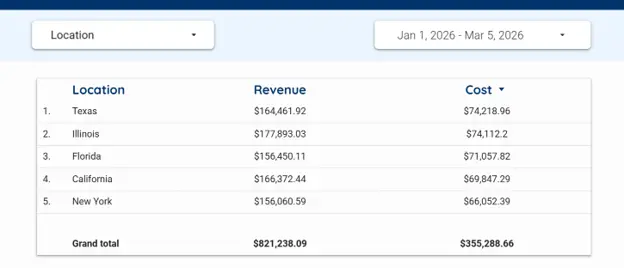
Fig 10. Sample dashboard – owner/team can access ALL locations.
Testing ensures that filters, joins, and mapping tables are functioning as intended.
Proper testing also prevents data leakage and ensures the dashboard behaves consistently across user groups.
Best Practices for RLS Implementation
Organizations implementing Row-Level Security should follow several best practices to ensure long-term scalability.
- Maintain a Dedicated Access Table
Keep access permissions in a separate table rather than embedding them directly in reporting datasets. This allows easy updates when user access changes.
- Store Access Logic in Your Data Warehouse
Whenever possible, maintain permission logic within BigQuery views or tables rather than complex dashboard-level blends.
- Document Access Changes
Maintaining documentation ensures transparency and prevents access misconfigurations as teams grow.
- Test Regularly
As new users or locations are added, periodic testing ensures the security configuration remains accurate.
Advantages and Limitations
Advantages of RLS
- Enables secure dashboard sharing across multiple stakeholders
- Reduces the need to maintain multiple dashboard versions
- Supports scalable analytics environments
- Strengthens data governance and compliance
Limitations
- Requires proper access table maintenance
- Incorrect joins may lead to incomplete data visibility
- Implementation may become complex if multiple permission levels exist
Despite these limitations, Row-Level Security remains one of the most effective ways to scale dashboard distribution while protecting sensitive information.
Conclusion
Row-Level Security is a powerful feature that allows organizations to share analytics dashboards while maintaining strict data access controls.
By combining centralized reporting with dynamic access filtering, businesses can provide personalized insights to different stakeholders without duplicating dashboards.
When implemented correctly using tools like Looker Studio and data warehouses such as Google BigQuery, Row-Level Security enables scalable, secure, and efficient analytics environments.
For data-driven organizations managing dashboards across multiple teams or clients, RLS is not just a technical feature, it is a foundational component of responsible data governance.
At Data2Stats Consultancy Inc., we help organizations build secure and scalable analytics systems by developing interactive dashboards, implementing data governance strategies such as Row-Level Security, and providing expert support in Digital Marketing and Data Analysis. Our goal is to ensure that data is scientifically sound, reproducible, secure, and impactful.