
 Joshua David Gawat
You’ve built the page. You’ve written the content. Now you’re wondering why it isn’t showing up in search results.
More often than not, the answer isn’t your content; it’s the on-page SEO signals that tell search engines what your page is about, who it’s for, and why it deserves to rank. These signals aren’t hidden or complicated. They’re a checklist of specific elements that every page on your site either has or doesn’t.
This guide walks through every one of them plainly, with real examples pulled from our own work auditing the Data2Stats website so you can apply them to any page, whether you’re starting from scratch or improving something that’s already live.
What Is On-Page SEO and Why Does It Matter?
On-page SEO refers to everything you control directly on a webpage that helps search engines understand and rank it. This is different from off-page SEO (backlinks, external signals) and technical SEO (site speed, crawlability, server configuration) though all three work together.
Think of on-page SEO as your side of the conversation with Google. Every title tag, heading, image alt text, and internal link is a signal you’re sending about what your page contains and who should find it. The clearer those signals, the better your chances of appearing in front of the right audience.
The good news: on-page SEO is entirely within your control, and most of it can be checked and improved in an afternoon with the right tools. We use a combination of Rank Math (for per-page scoring inside WordPress), Screaming Frog (for site-wide technical audits), and Claude (for copy drafting and keyword refinement, more on how we use AI in our Vibe Coding Guide).
1. The Focus Keyword: Everything Starts Here
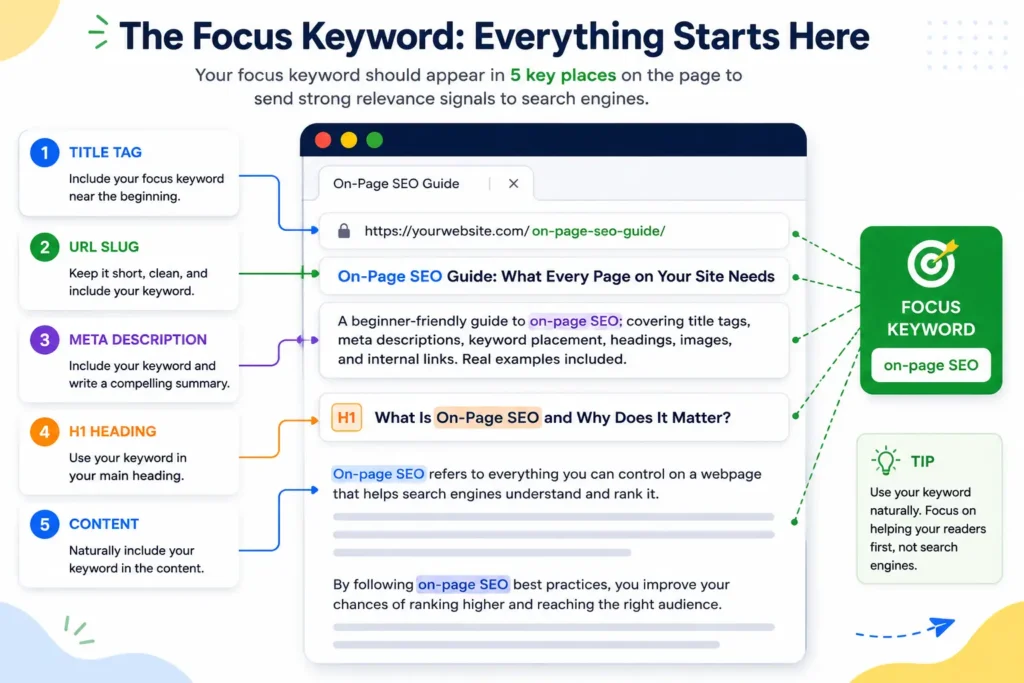
Before applying any on-page SEO fix, you need to know what keyword you’re targeting everything else builds from this single decision. This is the phrase someone would type into Google to find this specific page, not your homepage, not your whole site, just this page.
A focus keyword should be:
- Specific enough to match real search intent (not just “data” but “churn analysis report“)
- Relevant to what the page actually covers
- Realistic, a brand-new page won’t outrank established sites for “SEO” overnight, but it can rank for “how to write a meta description for a portfolio page”
Once you have your focus keyword, it needs to appear in five specific places. Miss any of them and you’re leaving ranking signals on the table.
2. Title Tag: Your First (and Most Important) Signal
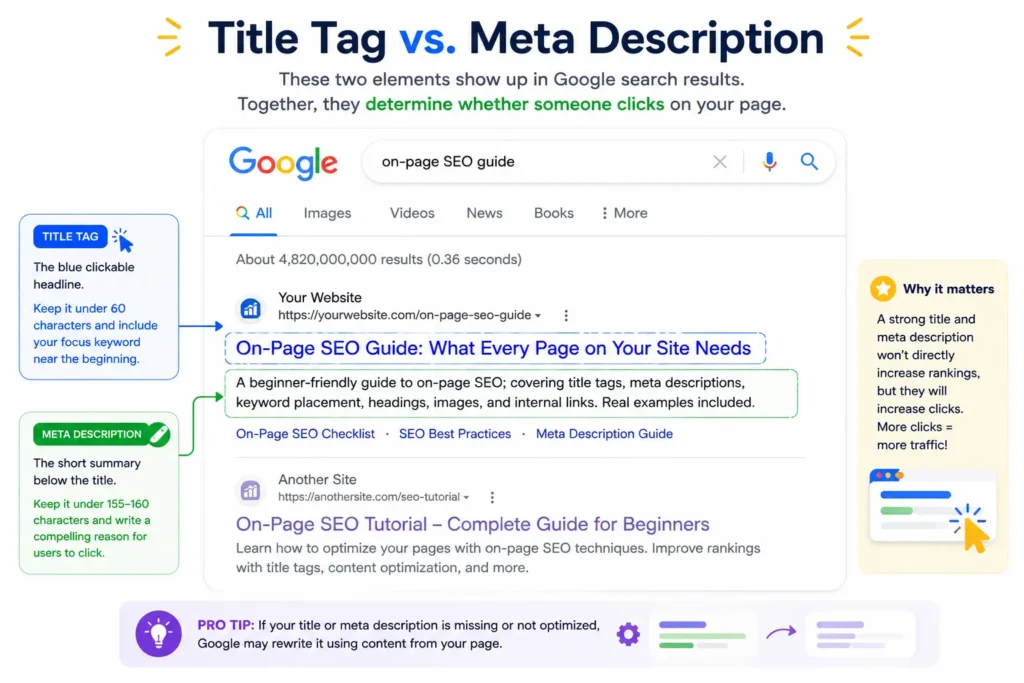
The title tag is your most important on-page SEO element — it’s the blue clickable headline that appears in Google search results and tells both users and search engines what your page is about.
What makes a good title tag:
- Contains the exact focus keyword, ideally near the beginning
- Under 60 characters (longer titles get cut off in search results)
- Accurately describes what the page is about
- Gives someone a reason to click
Real example from our audit: When we reviewed the Digital Marketing Analytics Report portfolio page at data2stats.com, the title tag read “Digital Marketing Report – Multi-Channel Analytics Dashboard.” The focus keyword was “digital marketing analytics report” , but the word “analytics” was missing from the title entirely. Rank Math does exact string matching, so “Digital Marketing Report” didn’t count toward the focus keyword at all, despite being close.
The fix was simple: “Digital Marketing Analytics Report – Multi-Channel Dashboard” , one word added, keyword match resolved.
On power words and sentiment words: SEO tools like Rank Math flag titles that don’t contain a “power word” (like “Expert,” “Proven,” “Ultimate”) or a sentiment word. For blog posts and consumer-facing content, this is worth paying attention to, emotional language does improve click-through rates. For B2B services pages and professional case studies, be careful. “Ultimate Data Analysis Services” sounds like a clickbait headline on a consulting page. Use a credible, backed-up word like “Expert” or “Trusted” if you need the flag cleared, and skip it entirely if it undermines your professional tone.
3. Meta Description: Your Search Result Pitch
After the title tag, the meta description is the next on-page SEO element that directly affects whether someone clicks your result. Google doesn’t use it as a direct ranking signal, but it directly affects whether someone clicks your result over the one above or below it.
What makes a good meta description:
- Contains the exact focus keyword (Rank Math checks for this)
- Under 155–160 characters (anything longer gets truncated mid-sentence)
- Reads like a human wrote it for a human, not a robot stuffing keywords
- Tells the reader what they’ll get if they click
Real example from our audit: The meta description for the Integrations Report page was 258 characters, almost double the limit. Google was truncating it mid-sentence in search results, cutting off before the most compelling part of the description. The fix: trimmed to 128 characters while keeping all the key information, and the exact phrase “integrations report” moved to the first sentence so it appears even if the rest gets cut.
One more thing: if you’re using a plugin like Rank Math, your meta description populates three separate fields, the standard meta description, the Open Graph description (used by Facebook and LinkedIn when your page is shared), and the Twitter description. If you leave the social fields blank, they inherit from the standard description automatically. If someone previously typed custom text into those fields, updating the standard description won’t change them, check all three.
4. URL Slug: Clean, Readable, Keyword-Relevant
Your URL slug is one of the foundational on-page SEO elements — it’s the part after the domain, like /on-page-seo-guide/ is this post’s slug. A well-structured slug is short, readable, and contains the focus keyword.
What to avoid:
- Auto-generated slugs with random numbers or dates (/?p=1482)
- Long slugs that include every word from the title (/on-page-seo-made-simple-what-every-page-on-your-site-needs/)
- Slugs that don’t match what the page is actually about
Real example from our audit: We found a case-control study blog post at data2stats.com sitting on the slug /cross-sectional-study-r/ — a slug that matched a completely different page topic. The slug was likely set incorrectly during publishing and never updated. This kind of mismatch between URL, title, and content sends conflicting signals to search engines. The fix: re-slug the post to /case-control-study-r/ and set up a 301 redirect from the old URL so any existing links don’t break.
One rule on changing slugs: once a page has been live for a while, its URL may have backlinks, bookmarks, or indexed entries pointing to it. Always set up a 301 redirect before changing a slug on a live page, never just swap it and leave the old URL returning a 404.
5. Headings: Structure Your Content for Humans and Bots
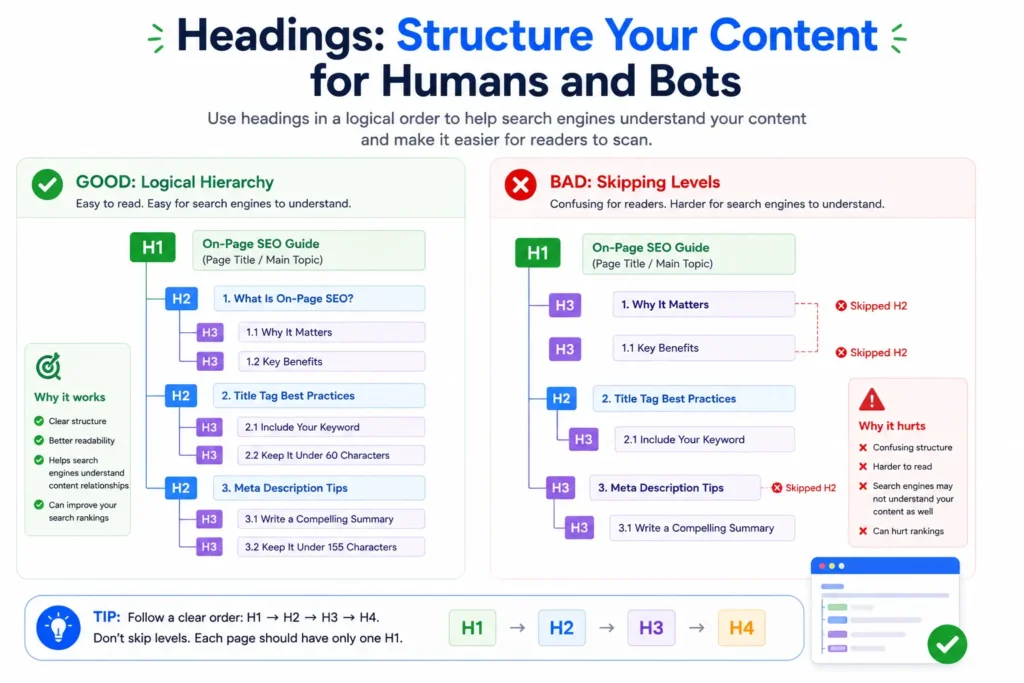
Headings (H1, H2, H3, and so on) do two jobs: they make long content scannable for readers, and they tell search engines how your content is organized.
The rules:
- Every page should have exactly one H1 — usually the page title
- H2s break the page into major sections
- H3s break H2 sections into subsections
- Never skip levels (don’t go from H2 straight to H4)
- The focus keyword should appear in at least one H2 or H3
Real example from our audit: A Screaming Frog crawl of data2stats.com revealed that the “More Dashboards” carousel section on every portfolio page was rendering its eight portfolio card titles as real H3 heading tags, three times each, because the slider clones slides for an infinite-loop scroll effect. This meant Google was reading 24 repeated H3 headings on each page, all cycling through the same eight names. The fix: set aria-hidden=”true” on the cloned slides so only one real set of headings gets indexed.
This is exactly the kind of issue that Rank Math, which only sees one page at a time — would never catch. It only appeared when Screaming Frog crawled the full site and showed the pattern repeating across every portfolio page.
6. Keyword Density: Present, Not Stuffed
Keyword density is the on-page SEO metric that measures how often your focus keyword appears relative to the total word count, and it’s one of the flags most commonly misread in tools like Rank Math. Too low and search engines don’t get a clear topical signal; too high and it looks like keyword stuffing, which Google penalizes.
The sweet spot is roughly 1–1.5%. For a 400-word page, that’s 4–6 natural mentions.
The most common mistake: The keyword appears in the intro paragraph and nowhere else. The sections lower on the page — benefits, features, process steps, competitive edge subsections, use generic language that never repeats the topic phrase. This is the most common pattern we found during the Data2Stats audit, and fixing it is as simple as inserting the phrase once, naturally, into each section that previously avoided it.
What to avoid: Forcing the keyword into places it doesn’t belong just to hit a number. “Our data analytics consulting data analytics consulting services offer data analytics consulting” isn’t optimization — it’s noise, and Google’s algorithms are trained to detect it. If it sounds wrong when you read it aloud, rewrite it.
7. Image Alt Text: Accessibility and SEO in One
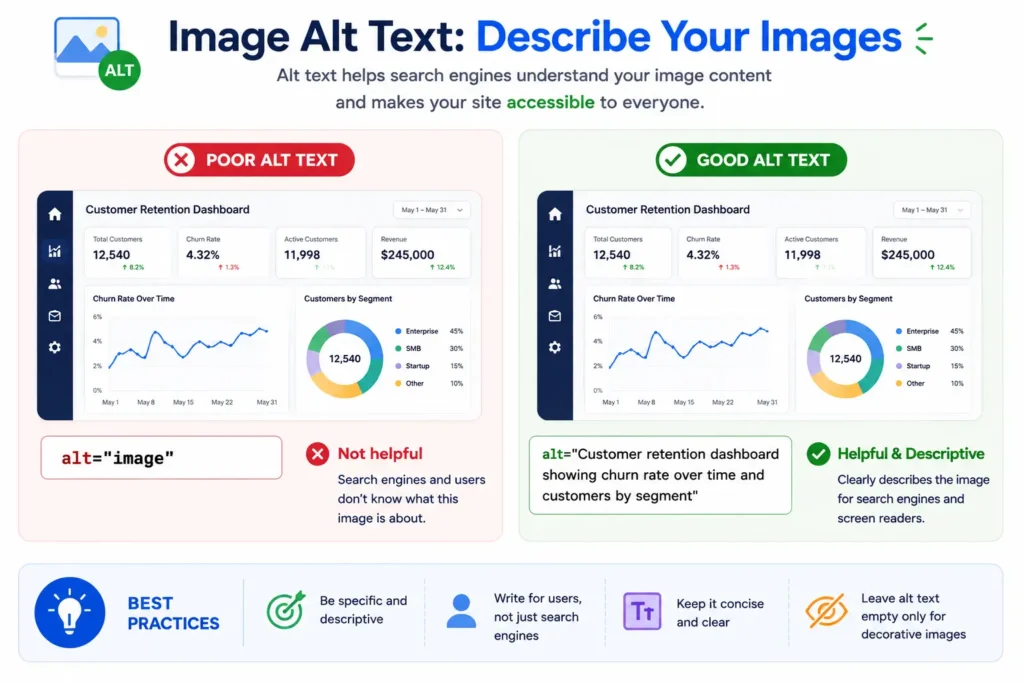
Every image on your page should have an alt text attribute, a short text description of what the image shows. Alt text serves two purposes: it’s read aloud by screen readers for visually impaired users, and it’s how search engines understand what an image depicts.
For on-page SEO purposes: At least one image on the page should have the focus keyword in its alt text. This is consistently one of the easiest flags to clear and one of the most frequently skipped.
What good alt text looks like:
- Describes the image specifically: alt=”Churn analysis dashboard showing customer retention trends by segment”
- Not generic: alt=”image” or alt=”screenshot” tells nobody anything
- Not stuffed: alt=”churn analysis report churn analysis data churn” is keyword stuffing
One practical note: If your site logo appears in the page header with the focus keyword in its alt text, your SEO plugin may or may not count it depending on whether it reads header/nav content as part of the page body. When in doubt, add the keyword to an image that sits inside the actual content area of the page rather than the template header.
8. Internal Links: Connect Your Site Together
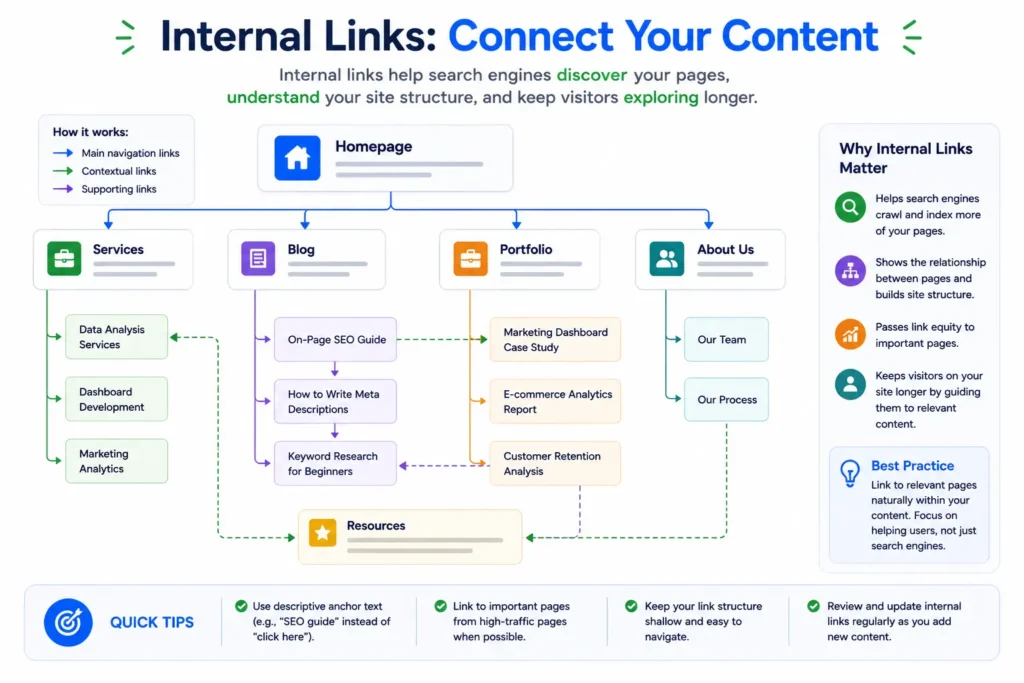
Internal linking is one of the most underrated on-page SEO signals — it refers to any link from one page on your site to another page on the same site. Internal linking is one of the most underrated on-page SEO signals. Every page should have at least one internal link, ideally pointing to a relevant service page, portfolio piece, or related blog post.
Why internal links matter: They pass authority between pages, help search engines discover and re-crawl content, and keep visitors moving through your site rather than bouncing after reading one page.
What we found during the audit: Several service pages at data2stats.com had internal links pointing to research methodology blog posts on topics completely unrelated to the service being described, a digital marketing analytics page linking to an intervention study post, an operational optimization page linking to a clinical trials post. These were likely template placeholders that never got updated with topically relevant destinations. A visitor clicking “optimize marketing performance” and landing on a page about retrospective clinical trial methodology is a jarring experience that hurts trust and time-on-site.
The fix: replace each mismatched internal link with a link to an actual related portfolio page or blog post. In most cases, a relevant destination already existed on the site, it just hadn’t been linked yet.
9. Outbound Links: Cite Your Sources
Outbound links are a commonly skipped on-page SEO element — these are links from your page to external websites that act as a trust signal to search engines. They show search engines that your content exists in a broader conversation and that you’re willing to reference authoritative sources rather than keeping readers in an information silo.
The rules:
- Link to authoritative, relevant sources (official documentation, academic references, recognized industry sites)
- Open external links in a new tab (target=”_blank” rel=”noopener”) so visitors don’t lose your page
- No permission is required to link to a public webpage, a standard hyperlink is not an endorsement and requires no agreement from the linked site
- Set internal links to open in the same tab, reserve new-tab behavior for external destinations only
What counts as a good outbound link: For a statistical consulting page, linking “sample size calculations” to a National Library of Medicine article is a strong, authoritative reference. For a data visualization page, linking “dashboards” to Google’s Data Studio documentation is relevant and credible. For a machine learning page, linking “algorithms” to IBM’s official topic page on machine learning is a stable, recognized source.
10. FAQ Schema: Free Real Estate in Search Results
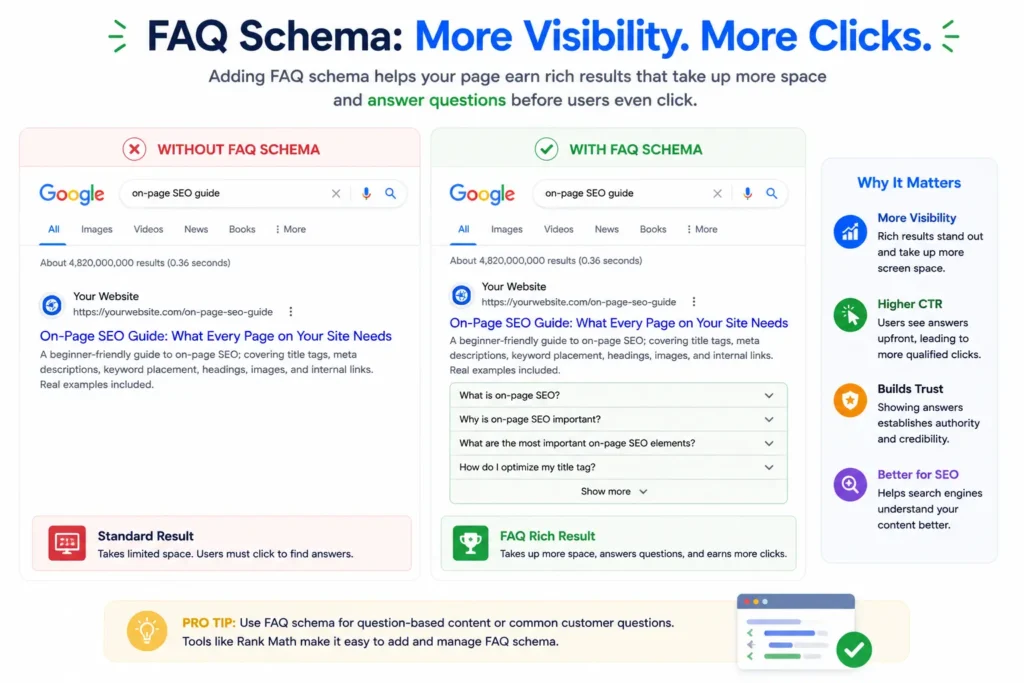
FAQ schema is the on-page SEO element most likely to earn you extra SERP real estate — marking up your FAQ section with FAQPage schema makes it eligible for rich snippets directly in Google search results. The expandable question-and-answer blocks that appear directly in search results before anyone clicks.
These take up significantly more space in the SERP than a standard result and can dramatically improve click-through rate without needing to rank any higher.
How to do it in WordPress: Use the dedicated FAQ block in the WordPress block editor (search “FAQ” when adding a block), not plain paragraphs with bold question text. The FAQ block outputs the correct schema markup automatically. If you write Q&As as regular text, they look identical on the page but produce no schema benefit in search.
What makes a good FAQ answer for snippets: Keep answers between 40–60 words. Lead with the direct answer in the first sentence. Google tends to pull short, complete answers rather than long paragraphs, a 200-word answer is less likely to win a snippet than a 45-word one that answers the question immediately.
Your Complete On-Page SEO Checklist
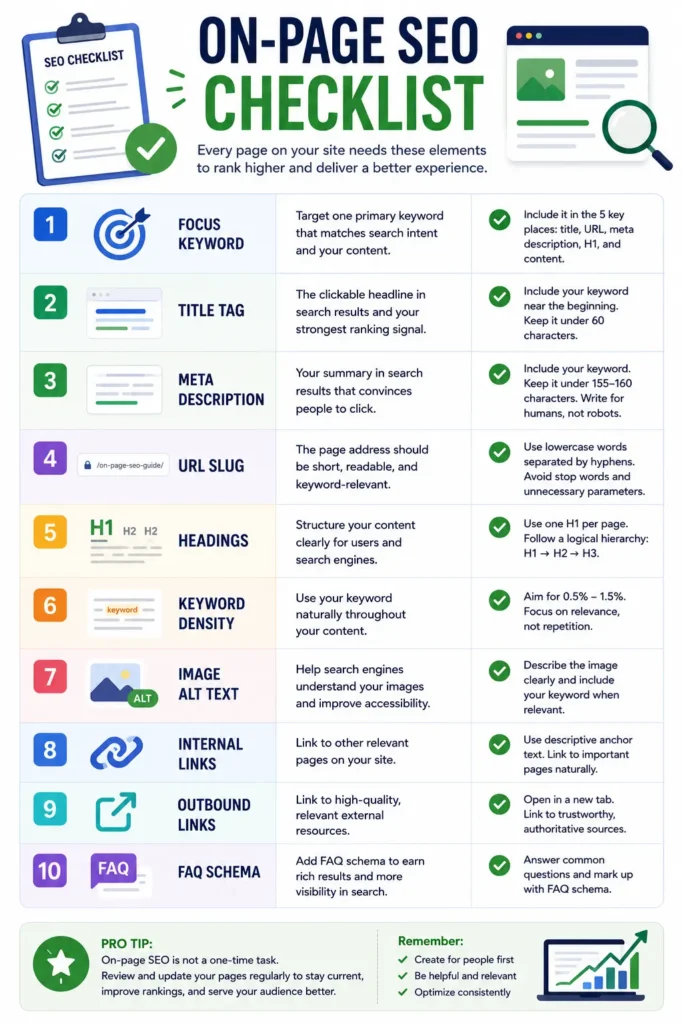
Before publishing any page, run through on-page SEO checklist:
Foundation:
- [ ] Focus keyword identified — specific, realistic, matches page content
- [ ] Focus keyword in title tag (exact match, near the beginning, under 60 chars)
- [ ] Focus keyword in URL slug (short, readable, no auto-generated numbers)
- [ ] Focus keyword in meta description (under 155 characters, reads naturally)
- [ ] Focus keyword in first paragraph of content
Content structure:
- [ ] One H1 on the page (usually the title)
- [ ] Focus keyword in at least one H2 or H3
- [ ] No skipped heading levels (H2 → H3, never H2 → H4)
- [ ] Keyword density between 1–1.5% (check with your SEO plugin)
Media and links:
- [ ] At least one image with focus keyword in alt text
- [ ] All images have descriptive alt text (not “image” or blank)
- [ ] At least one internal link to a relevant page on your site
- [ ] At least one outbound link to an authoritative external source
- [ ] External links open in new tab (target=”_blank” rel=”noopener”)
- [ ] Internal links open in the same tab
- [ ] Internal links in blog posts/long content, New tab is fine
- [ ] Internal links in navigation, menus, CTAs same tab
Extras that move the needle:
- [ ] FAQ section uses the WordPress FAQ block (not plain paragraphs) for schema
- [ ] Meta description, og:description, and twitter:description are all updated
- [ ] Page cache cleared after saving so changes go live immediately
On-page SEO isn’t a one-time task, it’s a habit. The pages that rank well consistently aren’t the ones that got lucky with a keyword; they’re the ones where every signal is clear, every element is intentional, and the content genuinely serves the person reading it.
Start with the on-page SEO checklist. Fix what’s missing. Then move to the next page, and repeat the same process every time you publish.
Want someone to run this audit for you? Get in touch with Data2Stats, we’ve done this across every page of our own site, and we can do the same for yours.