
 Beyonce Ramos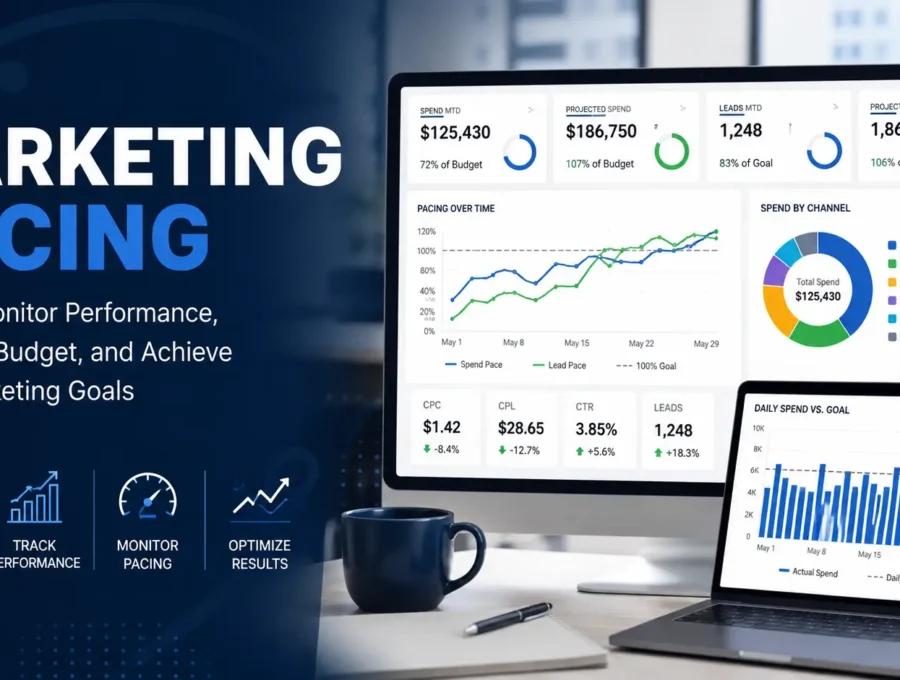
Introduction
Running digital marketing campaigns requires more than launching ads, it requires tracking whether campaigns are staying on budget and meeting performance goals. This process, known as marketing pacing, helps businesses monitor campaign progress, identify issues early, and make timely, data-driven decisions. In this guide, we’ll explain what marketing pacing is, why it matters, how it is measured, and how pacing dashboards help optimize marketing performance.
What is Marketing Pacing
Marketing pacing is the continuous process of monitoring a marketing campaign’s actual performance against its planned budget and objectives throughout the campaign period. By regularly comparing key performance indicators (KPIs), such as spending, leads, clicks, and conversions, with the company’s targets, businesses can identify overspending, underspending, or underperforming campaigns early and make timely adjustments. This enables organizations to optimize budget allocation, improve campaign performance, stay on track toward their marketing goals, and maximize return on investment (ROI).
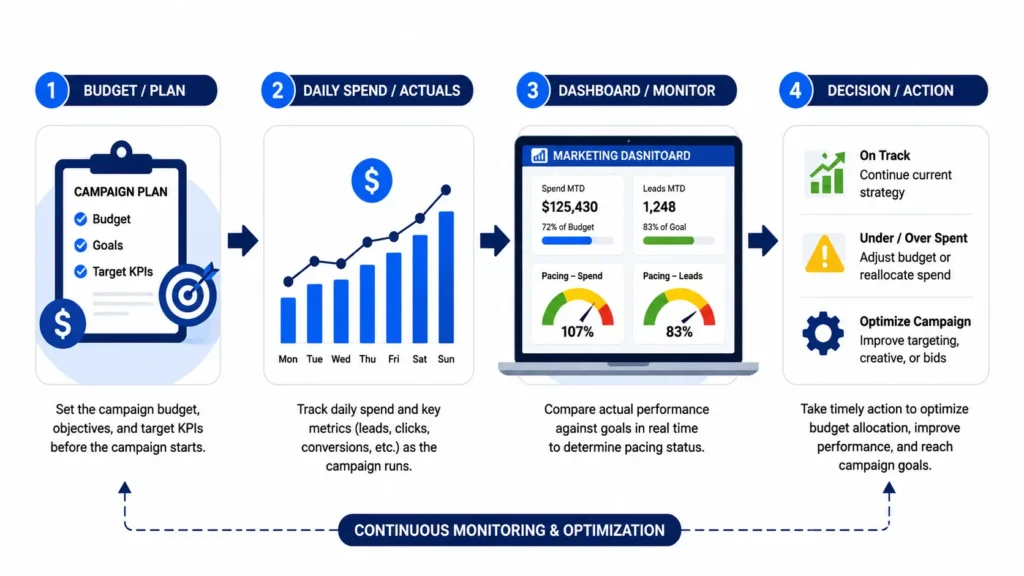
Fig 2. This image is made with Canva
Why Marketing Pacing Matters
Launching a marketing campaign is only the beginning. Without regularly monitoring its progress, businesses may spend their budget too quickly, fail to meet lead targets, or overlook performance issues until the campaign has ended.
For example, a business running a month-long campaign may have already spent 80% of its budget halfway through the month while generating only half of its target leads. Marketing pacing helps identify these imbalances early, which allows marketers to adjust budgets, optimize campaigns, or refine targeting strategies before the reporting period ends.
Marketing pacing helps businesses:
- Prevent overspending and underspending.
- Detect campaign performance issues early.
- Optimize budget allocation across campaigns.
- Improve campaign efficiency and return on investment (ROI).
- Support faster, data-driven marketing decisions.
How Pacing is Measured?
Marketing pacing is measured by comparing a campaign’s actual performance against its planned goals. This involves organizing campaign data, computing pacing metrics, and visualizing the results in a dashboard for continuous performance monitoring.
Step 1. Prepare the Raw Marketing Data
First, collect the raw marketing campaign data in a spreadsheet. The dataset should include fields such as the date, location, account name, account id, campaign name, campaign id, ad group name, platform, channel, datasource, costs, currency, clicks,engagements, views, video views, phone calls, form submissions, leads, and impressions.
Step 2. Organize the Monthly Pacing Dataset
Next, the daily campaign records are aggregated into a monthly pacing dataset, generating the MTD metrics needed to measure campaign performance.

Fig 3. Sample Monthly Pacing Dataset (Google Sheets)
Step 3. Identify the Marketing Pacing Metrics
Afterward, create the formulas for the marketing pacing metrics. The sample formulas below can be used as a reference and adjusted to match your own dataset, field names, and reporting requirements.
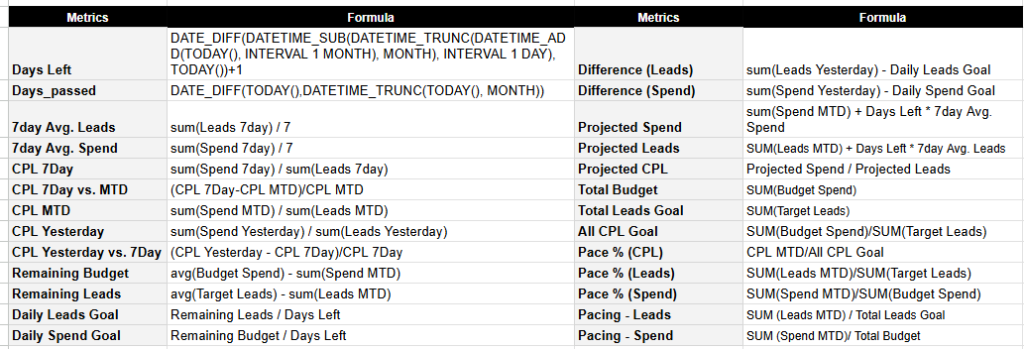
Fig 4. Sample Marketing Pacing Formulas
Step 4. Create Calculated Fields in Looker Studio
Finally, add your formulas as calculated fields in Data Studio using your monthly pacing dataset. Simply create a new field, enter the formula for each pacing metric, and repeat the process until all required metrics have been added. Once completed, these calculated fields can be used to build your marketing pacing dashboard.
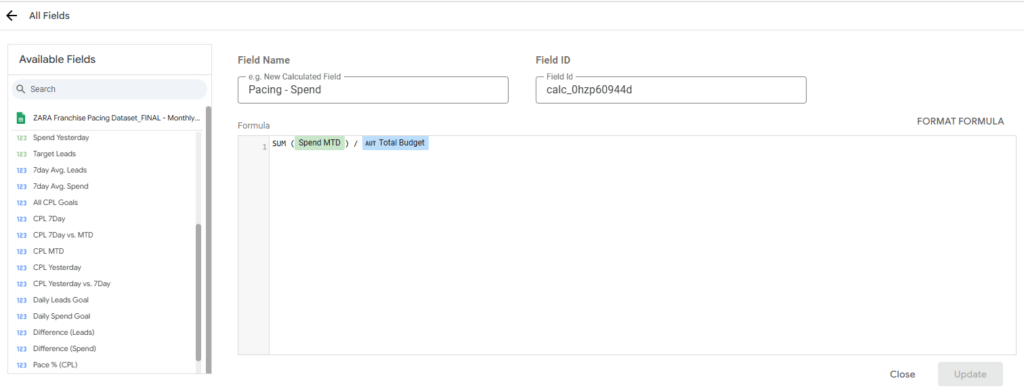
Fig 5. Creating a Calculated Field in Google Looker Studio.
Common Marketing Pacing Metrics
Marketing pacing uses several key performance indicators (KPIs) to evaluate whether a campaign is progressing toward its planned budget and marketing objectives. These metrics help marketers monitor campaign performance, identify potential issues, and make informed decisions throughout the reporting period.
| Metric | Description |
| Spend Goal | The planned advertising budget allocated for the campaign during the reporting period. |
| Spend MTD (Month-to-Date) | The total advertising spend accumulated from the beginning of the current month up to the current date. |
| Projected Spend | Estimates the total advertising spend by the end of the reporting period based on recent spending trends. |
| Leads | The total number of leads generated from user interactions across all advertising channels. |
| Leads Goal | The target number of leads the campaign aims to generate during the reporting period. |
| Leads MTD (Month-to-Date) | The total number of leads generated from the beginning of the current month up to the current date. |
| Projected Leads | Estimates the total number of leads expected by the end of the reporting period based on recent campaign performance. |
| Pacing Spend | Measures whether the projected advertising spend is on track with the planned campaign budget. |
| Pacing Leads | Measures whether the projected lead generation is on track to achieve the campaign target. |
| Cost per Lead (CPL) | The average advertising cost required to generate one lead. |
| Cost per Click (CPC) | The average cost incurred for each advertisement click. |
| Click-Through Rate (CTR) | The percentage of impressions that resulted in advertisement clicks. |
Benefits of Pacing Dashboard
A marketing pacing dashboard centralizes campaign data into a single interface using tools such as Google Data Studio, enabling marketers to monitor campaign performance, compare results against targets, and make timely, data-driven decisions. The following dashboard features demonstrate how marketing pacing supports effective campaign management.
1. Analyze Performance by Location
Interactive location filters enable users to evaluate marketing performance for individual franchise locations or compare multiple locations simultaneously. This helps businesses identify high-performing branches and allocate marketing resources more effectively.
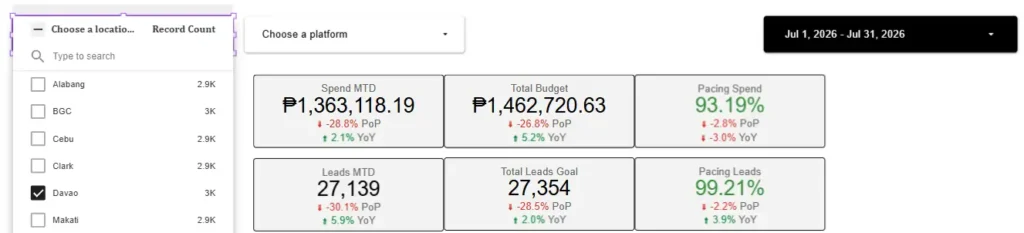
Fig 6. Filtering the Dashboard by Location.
2. Compare Advertising Platforms
Platform filters allow marketers to analyze campaign performance across advertising platforms. Comparing platform-specific metrics helps determine which channels contribute most effectively to campaign objectives.
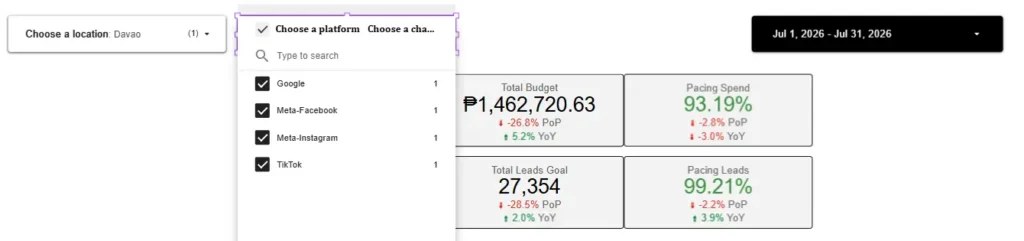
Fig 7. Filtering the Dashboard by Platform.
3. Analyze Different Reporting Periods
The date range control allows marketers to evaluate campaign performance over custom reporting periods. This feature supports month-to-date analysis, historical comparisons, and trend identification, enabling more informed marketing decisions.
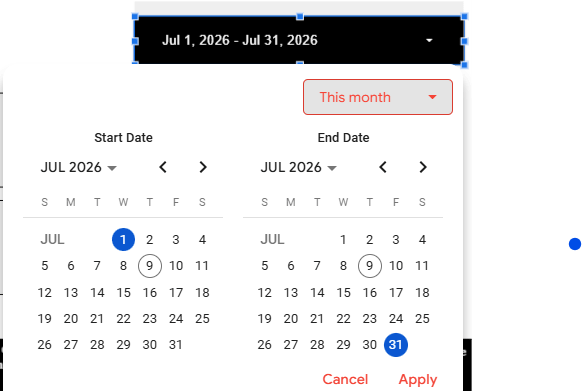
Fig 8. Filtering the Dashboard by Date Range.
4. Monitor Campaign Performance in Real Time
The dashboard provides a real-time overview of key performance indicators such as Spend MTD, Total Budget, Leads MTD, and Pacing metrics. These summary cards allow marketers to quickly assess whether campaigns are progressing toward their monthly goals without manually reviewing multiple reports.
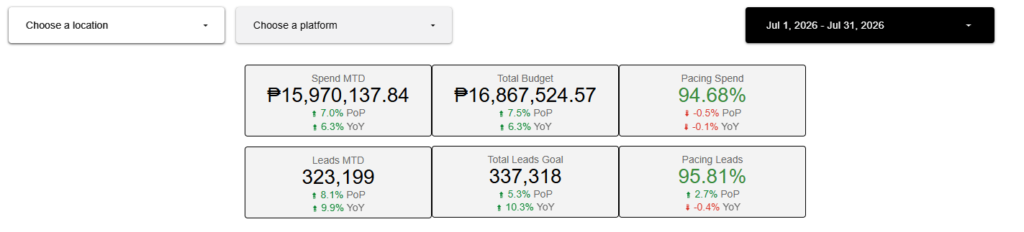
Fig 9. Marketing Pacing Dashboard Overview.
5. Track Budget Performance
The Budget Pacing dashboard visualizes daily advertising spend while comparing actual spending against planned budgets. Supporting metrics, including Projected Spend, Daily Spend Goal, Spend Yesterday, and Pace Percentage, help marketers identify whether campaigns are overspending, underspending, or remaining on track.
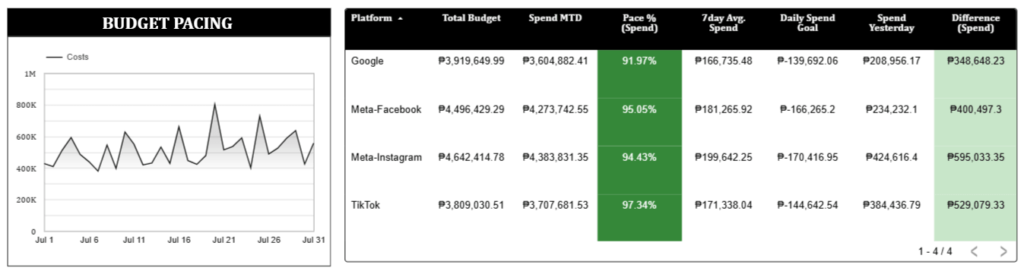
Fig 10. Budget Pacing Dashboard.
6. Measure Lead Generation Progress
The Leads Pacing dashboard monitors lead generation throughout the reporting period. By tracking Leads MTD, Projected Leads, Daily Leads Goal, and Pace Percentage, businesses can evaluate whether lead generation efforts are sufficient to achieve monthly marketing objectives.
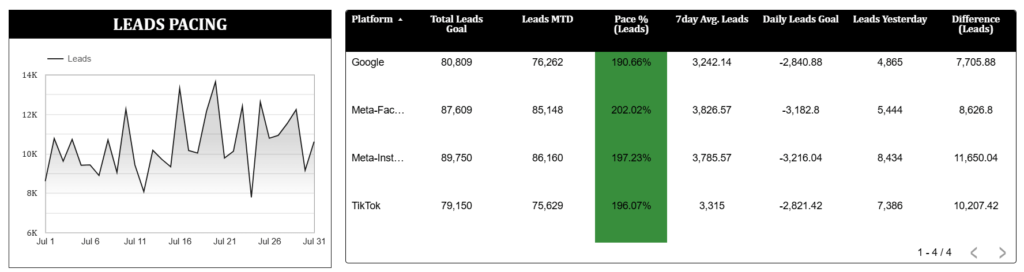
Fig 11. Leads Pacing Dashboard.
7. Evaluate Campaign Efficiency
Cost efficiency is monitored using Cost per Lead (CPL) metrics. The dashboard compares CPL MTD, Projected CPL, CPL Yesterday, and 7-Day Average CPL to determine whether advertising costs remain within acceptable targets and to identify opportunities for optimization.
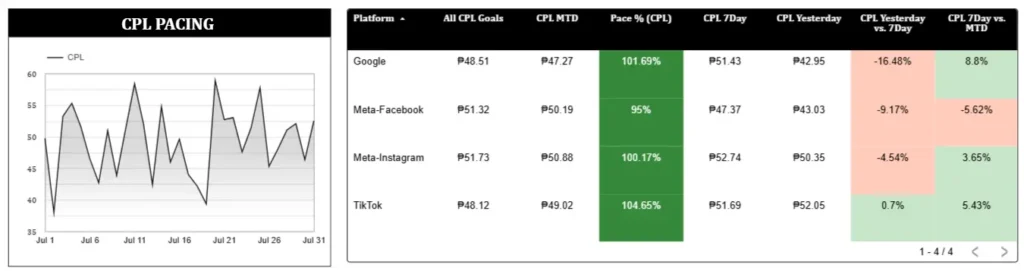
Fig 12. CPL Pacing Dashboard.
Common Marketing Pacing Mistakes to Avoid
Although marketing pacing helps businesses optimize campaign performance, its effectiveness depends on consistent monitoring and accurate analysis. Avoiding the following common mistakes can help marketers make better decisions and improve campaign outcomes.
- Waiting until the end of the month to review campaign performance instead of monitoring it regularly.
- Focusing only on advertising spend while overlooking other key metrics such as leads, CPC, and CTR.
- Ignoring pacing metrics, which can prevent marketers from identifying campaigns that are ahead of or behind schedule.
- Failing to compare actual performance with campaign goals, making it difficult to evaluate whether objectives are being achieved.
- Relying on manual reporting instead of automated dashboards, which can increase reporting errors and delay decision-making.
Best Practices for Marketing Pacing
To maximize the effectiveness of marketing pacing, businesses should adopt consistent monitoring and reporting practices throughout the campaign period. Following these best practices helps improve budget utilization, campaign performance, and decision-making.
- Monitor campaign pacing regularly to identify performance issues before they affect campaign objectives.
- Set realistic budgets and performance goals based on historical data and business objectives.
- Track multiple KPIs together, including spend, leads, CPC, CPL, and CTR, to gain a complete view of campaign performance.
- Use automated dashboards to provide real-time insights and reduce manual reporting efforts.
- Compare performance across channels and locations to identify top-performing campaigns and optimize budget allocation accordingly.
Conclusion
Marketing pacing is an essential practice for helping businesses monitor campaign performance, manage advertising budgets, and stay aligned with their marketing goals. By tracking key metrics such as Spend MTD and Leads MTD, marketers can identify performance trends early and make timely, data-driven decisions that improve campaign efficiency. Combined with automated dashboards and real-time reporting, marketing pacing enables organizations to optimize budget allocation, maximize return on investment (ROI), and achieve more effective marketing outcomes. At Data2Stats Consultancy Inc., we help businesses transform marketing data into actionable insights through customized dashboards and analytics solutions that support smarter, data-driven decision-making.